Build Edge Software Visually
Stay away from expensive IoT edge gateways. Customize your edge logic online in the Edge Logic Editor, then run it on the device you prefer: an industrial PC, a Raspberry Pi or any Linux or Windows box on the plant floor.
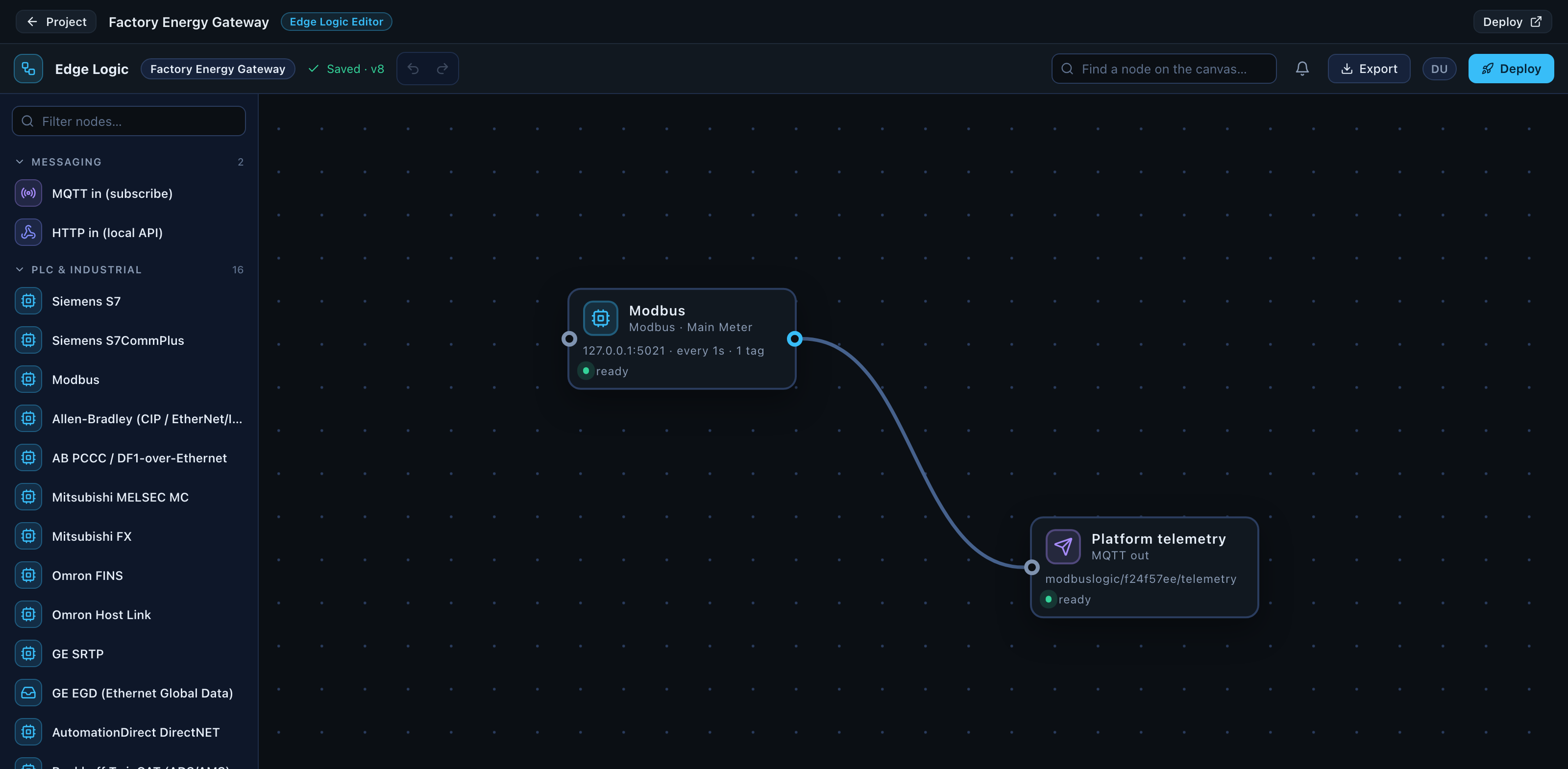
A gateway is a flow: a source, what happens to the values, and where they go.
Create → Build → Deploy
Create
Create a Gateway project in Modbus Logic Cloud. Nothing needs to be installed, and no device needs to be reachable.
Build
Use the Edge Logic Editor to add a device, define its tags, shape the values and route them to a destination.
Deploy
Download the trial zip for Windows or Linux (.deb for Debian, Ubuntu and Raspberry Pi OS) and run the Edge Gateway Console on the device: the first time it activates the design and installs the Edge Runtime as a service; every time after, it is the console that shows what the gateway is doing and what to check.
Designed in the Cloud. Runs at the Edge.
Modbus Logic Cloud is where the gateway is designed and versioned. The Edge Runtime is what executes it, on your hardware, on your network.
- 24×7 local operationThe runtime runs as a Windows Service, a systemd unit or a container. It starts with the machine and keeps its configuration.
- Local device connectivityModbus connections are made on the plant network, at full poll rate, without a round trip to anything.
- Store & ForwardA bounded on-disk buffer holds data while a destination is unreachable and replays it in order.
- Offline operationThe runtime does not need Modbus Logic Cloud to run. A cloud or Internet outage does not stop the gateway.
- Protocol conversionModbus in; MQTT, REST, SQL, OPC UA, BACnet/IP or WebSocket out.
Windows x64
Runs in the foreground or as a Windows Service.
Linux x64
Foreground or a systemd unit.
Linux ARM64
For edge computers and industrial PCs on ARM.
Docker
A container image with a mounted data volume.
Build first. Test it at the plant. License when ready.
The commercial unit is a production deployment licence, not a download. You can create projects and build gateways before you pay for anything.
Building is free
Create projects, use the Edge Logic Editor and validate your configuration without a licence.
Trial on real hardware
A validated project downloads as a trial package using the same production runtime binary, so what you test is what you deploy.
Licence the deployment
A production licence activates a deployment. Re-downloading the same licensed deployment for a reinstall or an update is not another purchase.
Common integrations
Modbus to MQTT
Modbus to REST API
Modbus to OPC UA
Modbus to BACnet/IP
Energy meter to MQTT
PLC to cloud
Industrial device to REST API
Siemens S7 to MQTT
EtherNet/IP to MQTT
Modbus to SQL database
Modbus to WebSocket dashboard
Modbus RTU to TCP converter
Any device to Modbus
OPC UA to MQTT
Mitsubishi MELSEC to MQTT
Omron FINS to MQTT
Beckhoff TwinCAT to MQTT
DNP3 to MQTT
BACnet to MQTT
SNMP to MQTT
Smart meter (M-Bus, DLMS) to MQTT
MTConnect to MQTT
Designed today, deployed later
These protocols are in the Edge Logic Editor, so the gateway can be designed and validated now. The current Edge Runtime does not deploy them yet, and a build that uses them is refused rather than producing a package that will not run.
Create the project in the cloud. Build it visually. Deploy it at the edge.
Start a project and open the Edge Logic Editor. You do not need a device in front of you, and you do not need to install anything to begin.