Modbus Scanner
Find the Modbus devices on a network, find the registers a device answers, work out what the values are, name them, and take the map with you. It reads. It never writes.
What it is
The Modbus Scanner is a standalone Windows program that opens in your browser. It is the tool for a device you have in front of you and no register manual for: it discovers, scans, decodes and exports, and the result feeds the Modbus Client, the Modbus Simulator and Edge Gateway.
- Run
ModbusLogic-Modbus-Scanner.exe. It picks a free port, starts the local engine and opens the UI; keep the console window open. - Like the Modbus Client, a tab is a server, and several can be open and scanning at once.
A worked example: a simulated energy meter
The quickest way to see what the Scanner does is to point it at a device whose map you already know. The screens below come from the Modbus Simulator serving an energy meter on this PC, port 5020, unit ID 1: nine float32 holding registers from address 100 (three voltages, three currents, frequency, active power) and a uint32 energy counter at 116, two input registers at 0 and 1, two coils and one discrete input. A physical meter on the network works the same way; only the host changes.
- Press Edit connection on the tab. Enter the host
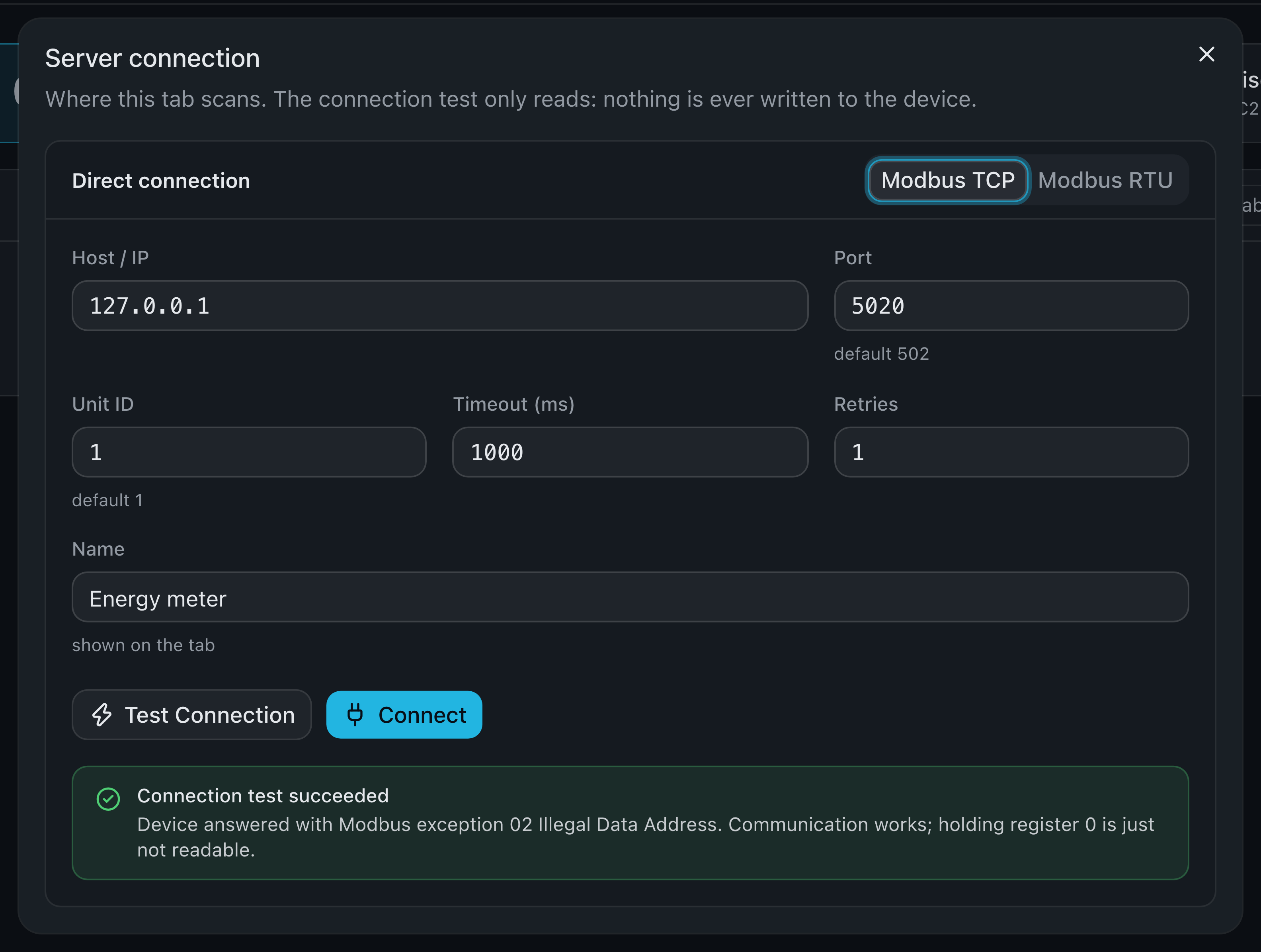
127.0.0.1, port5020, unit ID1and the name *Energy meter*, then Test Connection. The meter answers in a fraction of a millisecond with *exception 02 Illegal Data Address* for holding register 0, and the Scanner says what that means: communication works, register 0 is just not readable. That is normal for a device whose map starts higher up. - Connect. The status strip turns green: *Connected to 127.0.0.1:5020 · Unit 1*, and the counters start.
- Press Scan registers, leave the start at
0, set the end to1000, keep *Balanced* and Start scan. The same range is read from all four function blocks in turn.
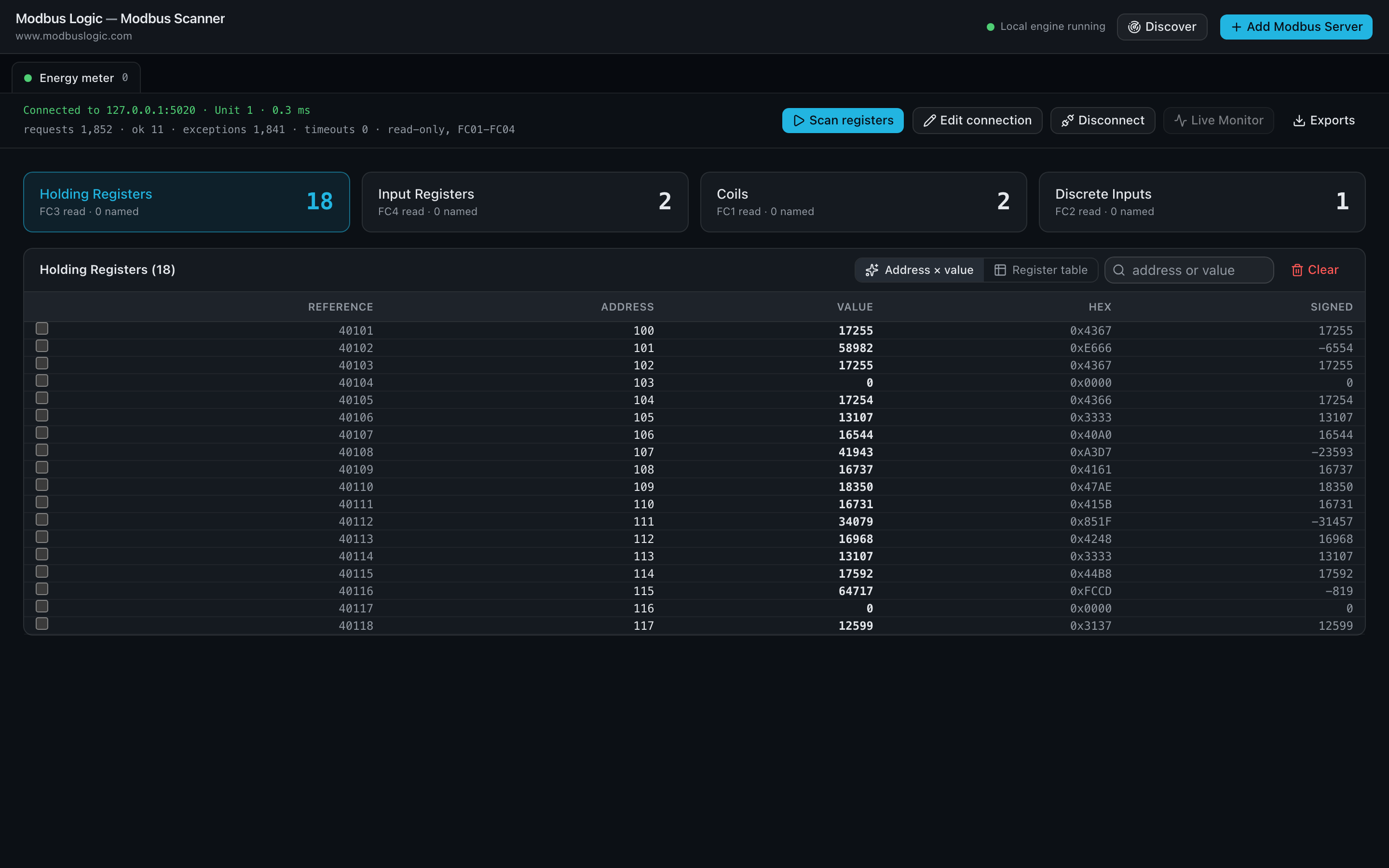
A few seconds later the four cards say what was found: 18 holding registers, 2 input registers, 2 coils and 1 discrete input, out of the thousand addresses probed in each block. The holding-register table lists addresses 100 to 117 with each value as decimal, hex and signed. The pairs are the tell: 0x4367 0x3333 at 100 and 101 is the float32 231.2, and the pattern repeats every two registers up to 115, while 116 and 117 hold a 32-bit counter.
- Tick registers 100 and 101 to open the inspector. It reads the pair as int16, uint16, int32, uint32, float32 and ASCII with every byte order, and marks *possible float32 (ABCD)* against the value near 231, which is what a line voltage looks like.
- Turn that interpretation into a named register: *Voltage_L1*, float32, unit V. Do the same for the other pairs, then poll them in the Live Monitor for a minute to confirm the decoding holds as the values move.
- Exports →
io-tags.jsongives the Modbus Client and Edge Gateway the finished map; *Simulator CSV* hands the device back to the Simulator so colleagues can work against it without the meter.
Discover
Discover finds devices before you know their addresses.
- Modbus TCP: a CIDR or IP range, a port, a timeout and a concurrency. Each host is classed as *valid Modbus response*, *port open but no Modbus*, *connection refused*, *timeout* or *unreachable*; an open port 502 alone is never reported as a device. A found device becomes a tab with one click.
- Modbus RTU: a unit ID sweep on a serial port, with the line settings, to find which slave addresses answer.
- Discovery runs only when you press it, has Pause and Stop, and honours the limits in Settings.
Server connection
The connection dialog takes Modbus TCP (host, port, unit ID, timeout, retries) or Modbus RTU (COM port with Refresh, baud rate, data bits, stop bits, parity, slave ID). Test Connection reports the round-trip time and the device identity when the device reports one, or a named failure with a troubleshooting card. Unit ID discovery, default 1 to 10, finds the slaves behind one TCP gateway.
Scanning registers
Scan registers scans all four function blocks, or the ranges you set, with contiguous block reads and an adaptive strategy. Results appear live with progress and an estimate; Pause and Stop are always there.
| Mode | Strategy | Finds |
|---|---|---|
| Quick | Blocks of the batch size; a failed block is split once into fifths; range edges refined. | Long ranges. May miss short ranges. |
| Balanced (default) | 100 → 20 → 5, probe the first register of each failed leaf, then refine edges register by register. | Every range at least 5 registers long or starting on a multiple of 5. |
| Deep | Failed blocks are split down to single registers. | Everything, including isolated registers. |
- Timeouts are never split, since each would cost a full timeout; three in a row abort the scan, and exception 01 aborts immediately because the function code is unsupported.
- Requests to one device are always serialised, with a minimum delay between them.
Results and the inspector
Each function block's results show the address in every notation (zero-based, one-based, reference, hex), the raw value as decimal, hex and binary, and the same registers read as INT16, UINT16, INT32, UINT32, FLOAT32 and ASCII side by side. Sort, filter, search, pin and copy; the table stays quick for thousands of rows.
- Select registers to open the inspector: every interpretation with every byte order, and hints such as *possible float32 (ABCD)* that are always labelled as possible, never as fact.
- One click turns an interpretation into a named register: name, data type, byte order, scaling (
(raw × multiplier ÷ divider) + offset), unit, description.
Live monitor
Named registers can be polled from 250 ms to 10 s: value, min, max, last update, and a trend of the last 1 min to 1 hour. Polling faster than the warning threshold asks first. This is the check that a decoding is right before you export it.
Exports and projects
| Export | Use |
|---|---|
io-tags.json | The tag map for the Modbus Client and Edge Gateway: names, data types, byte order, scaling, poll interval, all on zero-based addresses. |
| CSV · Excel · JSON | The named registers for a report or another tool. |
| Raw registers CSV | Every register a scan found, undecoded. |
| Simulator CSV · Simulator registers.json | A register map the Modbus Simulator imports unchanged, with the wire values in fixed mode, so the virtual device answers exactly like the physical one. |
A project is the servers with their scans and named registers, saved locally and as a .modbuslogic file. The Modbus Client opens the same file. Scan history is kept per project.
Read-only by design
- Only FC01–FC04 and the read-only FC43/14 device identification exist in the tool. There is no write code path, and the integration tests assert that a mock device receives zero write requests.
- Nothing runs in the background: discovery, scans and polling start only on a click.
- The local server listens on 127.0.0.1 only. Fully offline, no telemetry.